For agencies
One office per client. One place to answer for all of them.
For agencies that build agents for other companies. Each client gets an office of its own: its agents, rules, thresholds, people and record. Rules let routine work through, a person sees only what cannot be undone or crosses a threshold, and one press stops any agent.
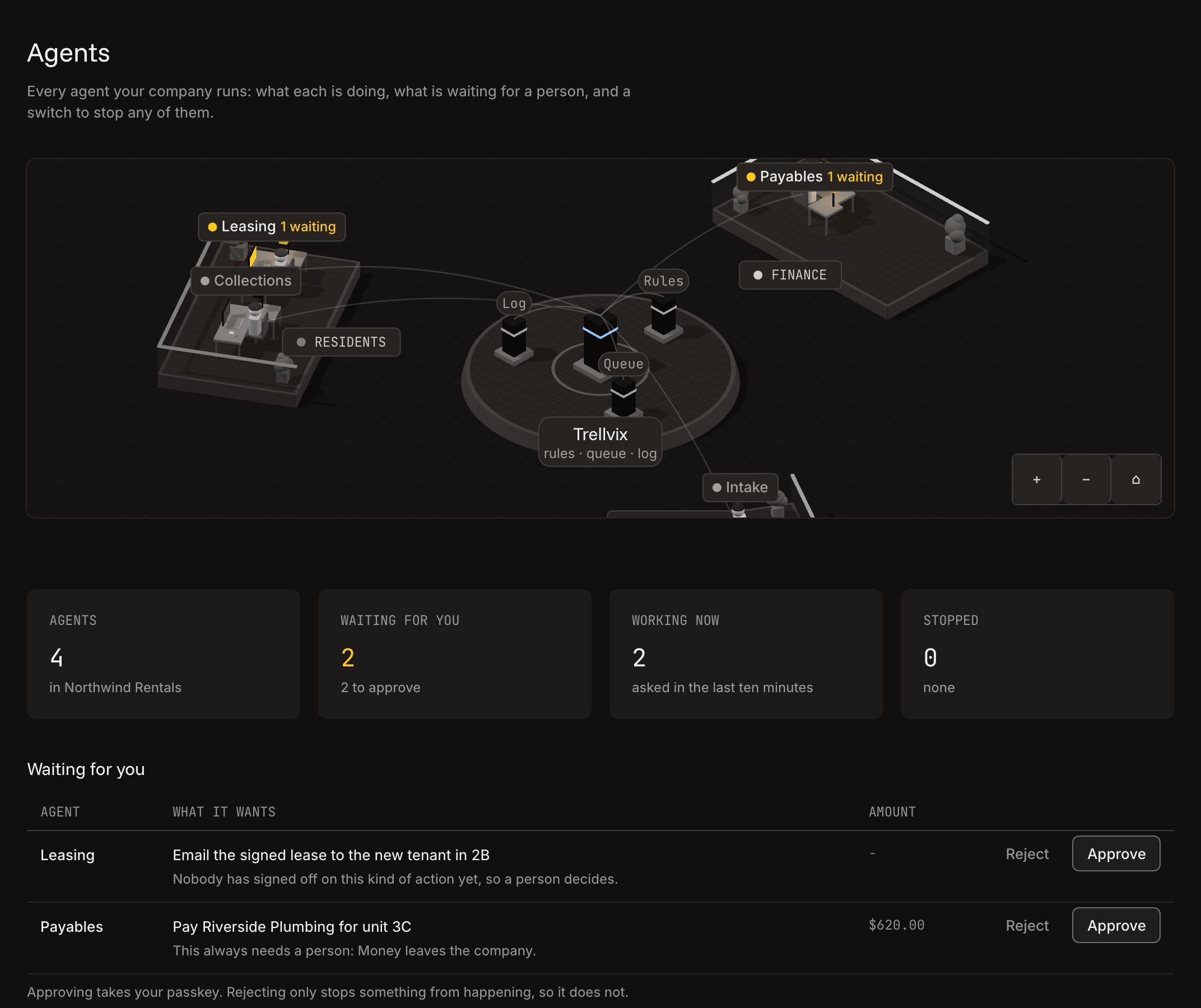
What holds, in every client office
- Separate: nothing shared between clients
- Rules: written per client, on the record
- Thresholds: an amount, or how many people
- Stop: one press, any agent
- Record: the client’s, as one file
What you rebuild today
You already built this. Once per client.
A Wait node, a button in a chat channel and a table of who said yes. It works, per workflow. As one n8n builder put it on the community forum, the real risk is “the one workflow where you forgot”.
One approval step, outside the workflow
The Trellvix node asks before the step that sends or spends. The rules, the people and the answer live in the client’s office, not in a sub-workflow you copy from client to client.
A named person, signed in
Whoever you or the client added decides, signed in as themselves. The decision carries their name, so who signed off is never a guess.
A record kept outside the workflow
What was asked, who or which rule let it through and what happened are written down by Trellvix when it answers, not by a node in the workflow. Clearing the workflow’s own history does not touch it.
What it does not do
A workflow that never asks is not held: Trellvix answers what it is asked, and it will not find the workflow you forgot. The record is a log we keep and can read. It is not sealed against us.
One office per client
Each client is a company of its own.
Nothing is shared between clients. Each office is kept in a store of its own, so one client never learns another exists.
Add a client
The same step as creating your own company: a name and a template for the kind of business. You are its owner, linked from the start.
The switcher
The current client’s name sits in the header. Open it for every client with what is waiting at each, and change client there.
The Clients view
One row per client: its agents, what is waiting, what is stopped, the last request. A line at the top says how much waits across all of them. A client whose office did not answer says so in its row. It never reads as nothing waiting.
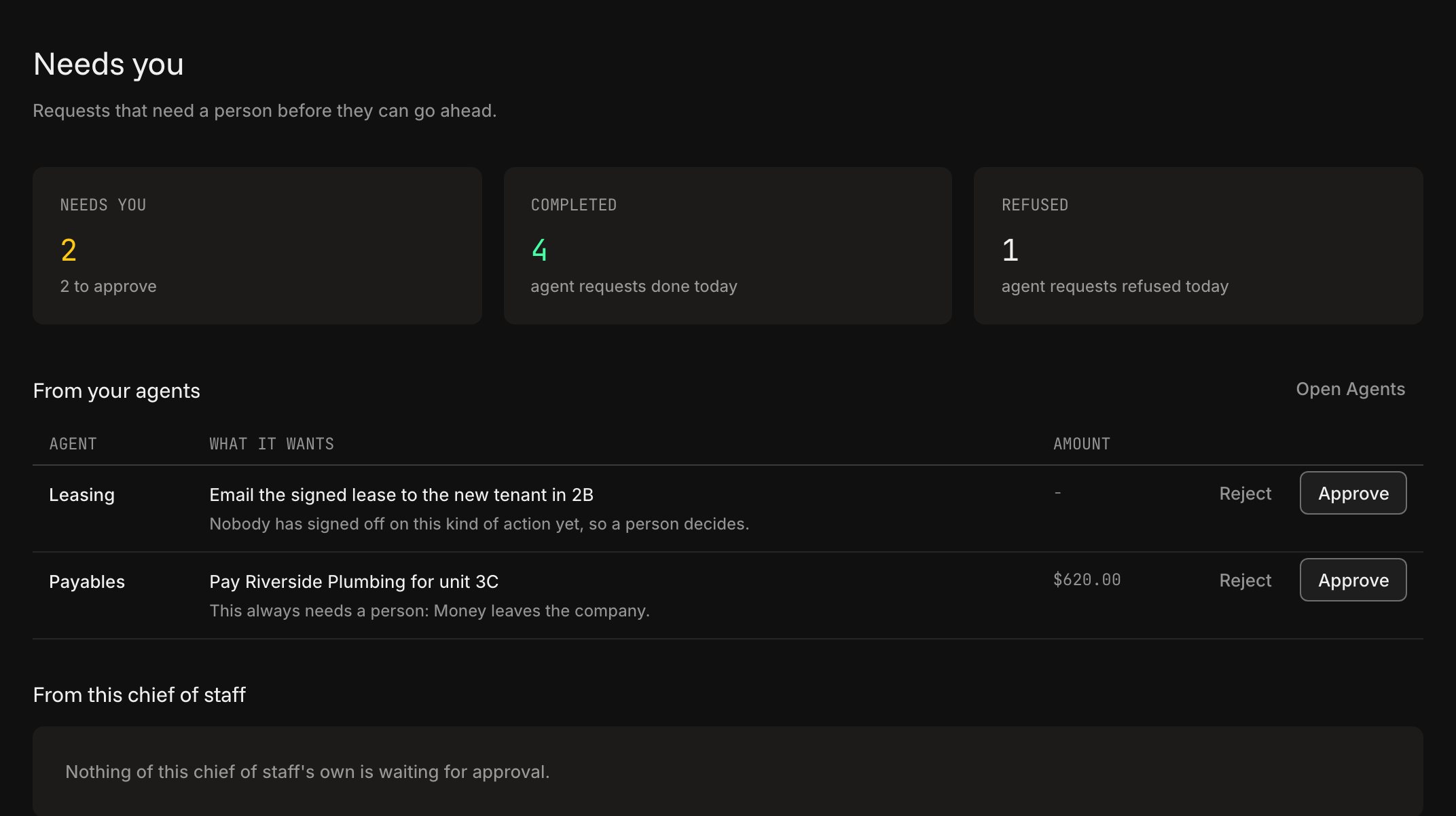
Needs you, across clients
Waiting requests from every client in one list, each naming its client. A decision is made through that client’s office and recorded there.
The client’s own people
Add the client’s people to their office as owner, approver or viewer. They sign in with a code sent to their work email and see their own office.
A place for the work
Each office has places and stages for what its agents handle: leads, tickets, invoices. A template sets them and an owner changes them.
Rules and thresholds
Routine work goes through. A person sees what matters.
Set per client, because the limit on a refund at one company is not the limit at another.
Rules, per client
A rule names an agent, a kind of request and a limit, by amount or by how many people a send reaches, with an end date. What it covers goes through on its own, and the log names the rule.
Thresholds, per client
An amount, or a number of people. At or above it a person decides whatever the rules say, and the request says which threshold it crossed.
Always needs a person
Mark a kind of request this way and no rule can cover it. A kind of request the office has not seen before waits for a person too.
Why it is waiting
Each waiting request says what it is, the amount, and why it waits: no rule covers it, it is over a rule’s limit, it crossed a threshold, or its kind always needs a person.
The stop
One press stops any agent, in any client’s office.
The thing a client asks for first, and the hardest to build per workflow.
One agent, or all of them
Stop one agent, or every agent in a client’s office, in one press. What a stopped agent asks for is refused until someone resumes it.
It reaches work in hand
Work approved but not yet run is covered. The workflow is told at the address it gave when it asked, and the Python and JavaScript clients check once more right before the step. In n8n, Check status leaves by Not allowed.
On the record
The record keeps who stopped what and why, on each request the stop covered.
What a stop cannot do
It cannot pull back a step that already ran, and it does not reach into a client’s other systems to take access away. It stops what asks Trellvix.
The record
The record is the client’s. Hand it over.
When a client asks who let that through, the answer is already written down.
One line per request
What the agent asked for, who or which rule let it through, and what happened afterwards. A refusal is kept with its reason.
One file, any day
An owner downloads every agent, rule, person and request in a client’s office as one file. Hand it to the client, or make the client an owner and let them take it themselves.
What it is not
It is not a certificate, and it is not yet a report under your agency’s name. It is the office’s own log, in a file.
Setup
From the tools you already build in.
The agents keep running where they run. Each adds one call before the step that acts, and reports the result after.
- n8nThe Trellvix node: Ask before acting, Check status and Report result, inside the workflow you already have.
- PythonOne file, standard library only. trellvix.guard around the step that acts.
- JavaScriptOne file, no dependencies. Node, Deno, Bun or Workers.
- MCPThe trellvix-mcp package gives a model ask, status, report and work as tools, in Claude Code, Claude Desktop or Cursor.
- HTTPThree routes from any language: ask, check, report.
- A guide for buildersEach workflow is one agent with its own key and its own list of tools. Anything off the list is refused.
Next: Make, Zapier. Not ready today.
Plainly
When you do not need this.
Said before you ask, because it is cheaper for both of us.
One client, one workflow
The Wait node you built is enough. Keep it.
Every agent inside one product
If everything a client runs lives inside one vendor’s product, that product’s own approval setting covers it. Trellvix holds agents that ask it: n8n, your code, MCP, HTTP.
Live conversation
Approval fits what can wait: a refund, a send to a list, a document going out. A caller on the line cannot wait for an approver, and that work should hand off to a person instead.
The rest of Trellvix.
Every agent in an office, what each is doing now, and a switch to stop any of them.
What waits for a person, with the request shown first.
Every request, who let it through, and what happened.
What holds, where data lives, and what we do not claim.
What may go ahead without asking, written by a person, with an end date.
Including why this, if you already built approvals in n8n.
One office per client. One press stops any agent.