Always needs a person
Marked this way, a request waits for a person every time. No rule can allow it.
Rules you write let routine work through. A person sees only what cannot be undone or crosses a threshold. One press stops any agent, and the record is yours to take with you.
See how it worksWhat holds, on every agent
Product
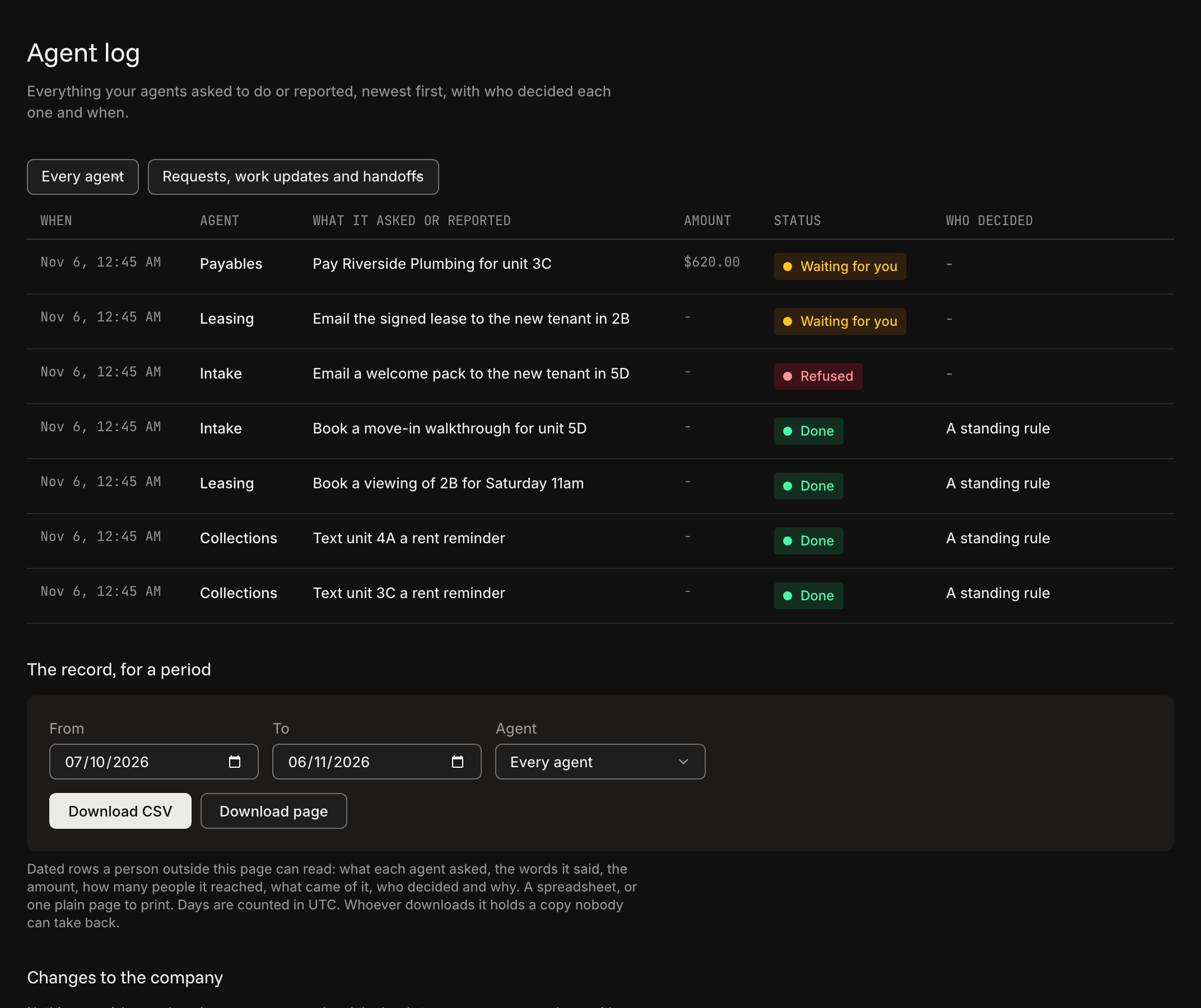
A rule a person wrote names an agent, a kind of request and a limit, with an end date. What it covers goes through on its own, and the log names the rule. Nobody approves the same reminder every month.
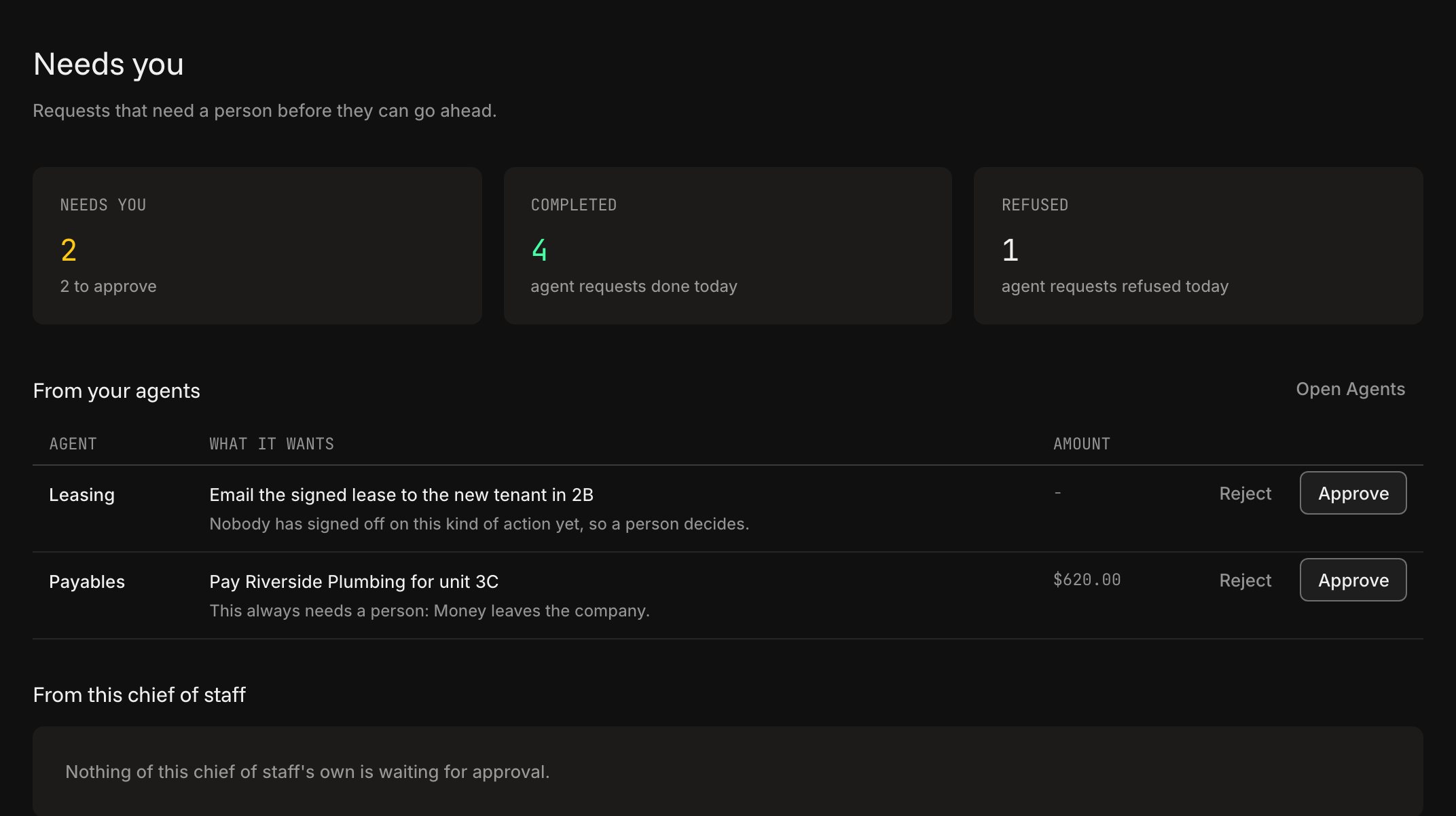
See how it worksWhat cannot be undone, what no rule covers, and anything at or above a threshold you set, by amount or by how many people a send reaches. Those wait, with the work already done, for someone you added.
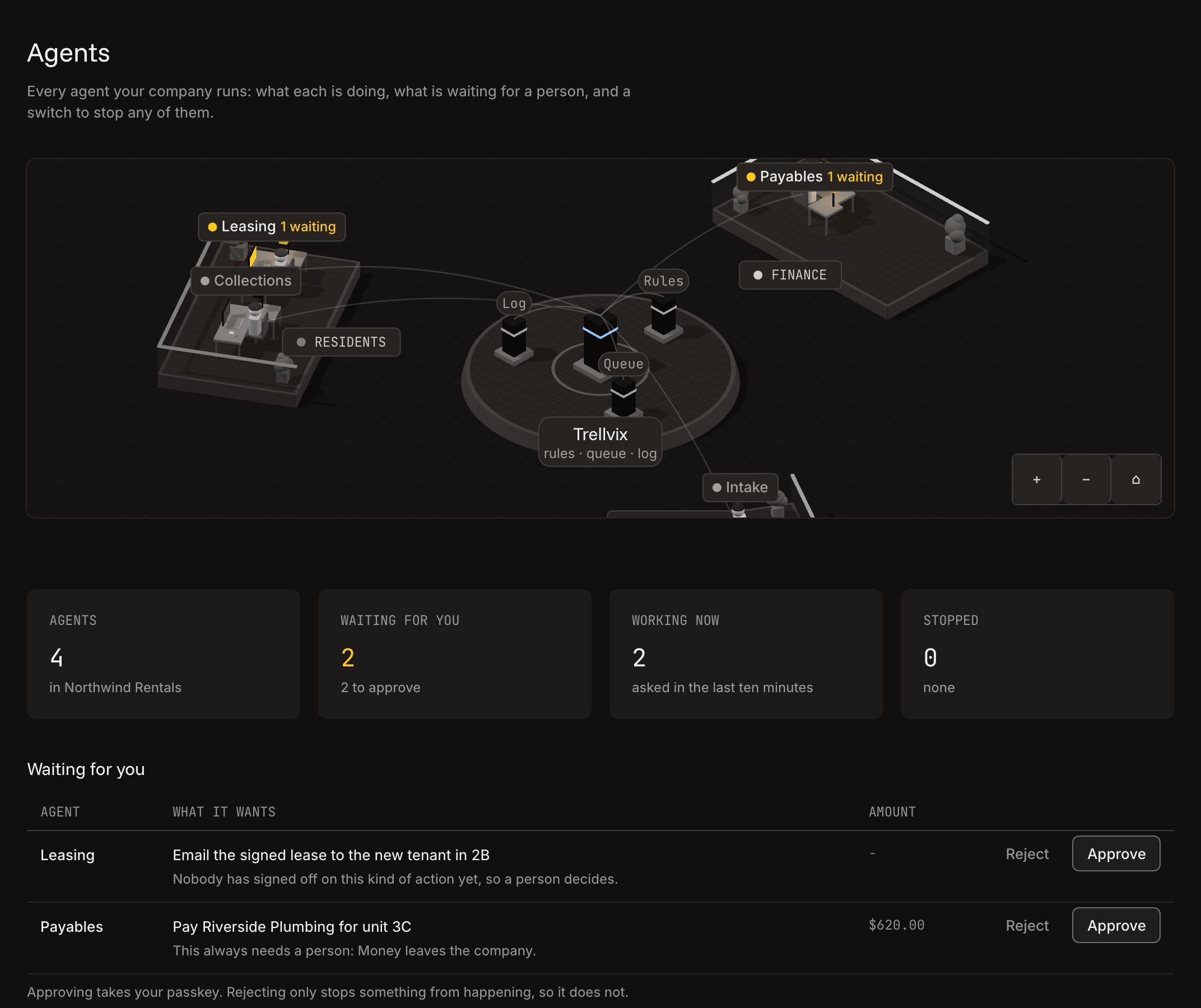
Stop one agent, or all of them, in one press. What a stopped agent asks for is refused, and work already approved but not yet run is checked again before the step, so the stop reaches it too.
What each agent asked for, who or which rule let it through, and what happened, one line per request. An owner downloads all of it as one file, any day. Leaving is never a support ticket.
Bring the agents you already have: n8n workflows, code in Python or JavaScript, an MCP client, anything that can make a web request. Each one gets a desk, a department and a line of what it is doing now.
Build agents for other companies? Each client is its own office, with its own agents, rules, thresholds, people and record. Nothing is shared between them, and you move between them from one switcher.
For agenciesThey keep running where they run. Each gets a desk, a department and a place for the work it handles, and asks before it spends, sends or does what cannot be undone. Ready today, from these.
Next: Make, Zapier.
Bring an agent in a few minutes. See what each one is doing, write the rules that let routine work through, decide the rest, and read what happened.
Every request,
on the record
with who let it through and what happened
Approving takes
a signed-in person
never a setting, never a vendor
Stops take
one press
one agent, or all of them
ChatGPT dots and Grok Bot are agents you hire from one company. Trellvix is where the agents you already have, from any of them or from your own code, ask before they act.
It does not replace them. It is where each of them asks before it spends or sends, and where you see, approve and stop them.
Your own code, n8n, a Claude or OpenAI tool, anything that can make a web request.
Anything that spends, sends or cannot be undone waits for someone you added, unless a rule you wrote allows it, and both are on the record.
No vendor can pay to change what your agents are allowed to do. That is built in, not a value on a page.
An owner downloads every agent, rule, person and request whenever they ask. Your agents never move in, so they never have to move out.
ChatGPT is a trademark of OpenAI. Grok is a trademark of xAI. Neither is affiliated with Trellvix. Their columns describe those products as their own public pages did on ; both ship quickly, so check them rather than taking our word for it.
For the people who build agents
Bring an agentAn n8n node, or three lines of Python or JavaScript, and an agent you already run asks before it spends, sends or does anything it cannot undo. Building for clients? One office per client.
$ curl -O https://platform.trellvix.com/sdk/trellvix.pycurl -O https://platform.trellvix.com/sdk/trellvix.mjsnpx trellvix-mcpSettings, Community nodes, Install "n8n-nodes-trellvix"export TRELLVIX_ORIGIN=https://platform.trellvix.com
# In your agent's environment: TRELLVIX_KEY and TRELLVIX_ORIGIN
import os
from trellvix import Trellvix

trellvix = Trellvix(key=os.environ["TRELLVIX_KEY"], origin=os.environ["TRELLVIX_ORIGIN"])

# Asks, waits for a person if the rules say so, runs, and reports.
# Refused, stopped or rejected never runs; no answer counts as no.
trellvix.guard({
    "tool": "email.send",
    "actionClass": "email.send.example",
    "summary": "What a person approving it will read",
    "consequence": "irreversible"
}, lambda decision: do_the_thing())
// Node 18+, Deno, Bun or Workers. One file, no dependencies.
import { Trellvix } from "./trellvix.mjs";
const trellvix = new Trellvix({ key: process.env.TRELLVIX_KEY, origin: process.env.TRELLVIX_ORIGIN });
await trellvix.guard({
tool: "email.send",
actionClass: "email.send.example",
summary: "What a person approving it will read",
consequence: "irreversible"
}, async () => {
// your agent does the thing here
});1. Add a credential "Trellvix agent key": your agent key and the Trellvix address.
2. Put a Trellvix node (Ask before acting) before the step that sends or spends.
What a person approving it reads: What a person approving it will read
Tool: email.send Kind of request: email.send.example
Three outputs:
Go ahead -> your step
Waiting for a person -> a Wait node (On webhook call), then Check status
Not allowed -> stop; {{ $json.says }} says why
3. After your step, a Trellvix node (Report result), so the log says it happened.# Claude Code
claude mcp add trellvix -e TRELLVIX_KEY=<key> -- npx trellvix-mcp
# Claude Desktop (claude_desktop_config.json) and Cursor (.cursor/mcp.json)
{ "mcpServers": { "trellvix": { "command": "npx", "args": ["-y", "trellvix-mcp"],
"env": { "TRELLVIX_KEY": "<key>" } } } }
# The model gets ask, status, report, work and office as tools. Your rules and a person still decide.# 1. Ask before acting
curl -X POST $TRELLVIX_ORIGIN/v1/actions \
-H "Authorization: Bearer $TRELLVIX_KEY" -H "Content-Type: application/json" \
-d '{"tool":"email.send","actionClass":"email.send.example","summary":"What a person approving it will read","consequence":"irreversible"}'
# 2. If waiting, ask again until a person decides
curl $TRELLVIX_ORIGIN/v1/actions/ACT_ID -H "Authorization: Bearer $TRELLVIX_KEY"
# 3. Say what happened
curl -X POST $TRELLVIX_ORIGIN/v1/actions/ACT_ID/result \
-H "Authorization: Bearer $TRELLVIX_KEY" -H "Content-Type: application/json" -d '{ "outcome": "done" }'Security and control
Marked this way, a request waits for a person every time. No rule can allow it.
Give your agents room to work. Keep the line where you put it.
Name an agent, a kind of request and a limit, with an end date. Revoke it any time, and what it covered waits for a person again. At or above a threshold you set, a person decides whatever the rules say.
Stop one agent, or all of them, in one press. What a stopped agent asks for is refused until someone resumes it, work approved but not yet run is checked again before the step, and the stop is on the record.
Set up Trellvix for this agent. Trellvix is the office this agent works in: it asks a person before anything that sends, spends or cannot be undone, reports what it did afterwards, and shows the work it handles on the floor, by place and stage. Engine: https://platform.trellvix.com Agent key: the key shown once under Bring an agent in Trellvix. Keep the key as TRELLVIX_KEY and the engine as TRELLVIX_ORIGIN in the agent's environment. Never put the key in a repo, a log or a message. Client: one file with no dependencies, https://platform.trellvix.com/sdk/trellvix.mjs for JavaScript or https://platform.trellvix.com/sdk/trellvix.py for Python. An MCP client (Claude Code, Claude Desktop, Cursor) uses the package trellvix-mcp instead: npx trellvix-mcp with TRELLVIX_KEY in its environment, and TRELLVIX_ORIGIN only when the engine is not the default. This agent may ask only for the kinds of request it was given when it was brought in. Anything else is refused. Places it may report work in: the office's places, from GET /v1/office. Do this: 1. Put ask before any step that sends, spends or cannot be undone: the tool, a summary a person can read, and the consequence. If the answer is waiting, check status until a person decides. 2. Put report after the step, with the request id and whether it was done or failed. 3. Put work wherever the agent handles an item of a known place: the kind, the company's own id for the item, a title, and the stage it is at now. 4. Never act on refused, stopped, rejected or waiting. No answer counts as no. Read https://trellvix.com/llms.txt first.
Name your chief of staff and bring your first agent.
One screen. Name it, prove you are a person, and make it yours with Touch ID. It answers to that name and to nothing else until you choose.
Added by your company to approve or watch its agents? Sign in at the company door with the code it emails you.
A passkey, not a password. Nothing to steal, nothing for us to leak.